Most beginners do not struggle with programming because they lack talent. They struggle because they get stuck, have nobody to ask, and lose momentum. A forgotten semicolon, a confusing error message, or a concept that never quite clicks can end a study session early.
This is where you can use ChatGPT to learn programming in a smarter way. Used well, it works like a patient tutor that explains ideas in simple words, reviews your code, and gives you practice problems at any hour. Used badly, it becomes a shortcut that hands you answers and leaves your skills exactly where they were.
In this guide, you will learn how to use ChatGPT as a learning partner, with copy-ready prompts, real Python examples, and a clear process you can follow from day one. At Akira Global Technologies, we want beginners to build a proper learning routine around AI tools, and this guide shows you how. This guide shows how to build a proper learning routine around them.
What Is ChatGPT and How Does It Help You Learn to Code?
ChatGPT is a conversational AI assistant from OpenAI. You type a question or instruction in plain English, and it replies with explanations, examples, and code. Because it keeps the context of your conversation, you can ask follow-up questions as many times as you need.
For learners, that is the real value. Textbooks and videos move at one speed. ChatGPT adapts to yours. If a loop explanation does not make sense, you can ask for a simpler one, a real-world analogy, or a different example.
OpenAI has also introduced a Study and learn option, announced in July 2025, which guides users through problems step by step instead of giving the answer straight away. You can read about it in OpenAI’s study mode announcement. Feature names, menus, and plan availability change over time, so check your own ChatGPT account. You can get the same effect in any chat by asking for hints rather than answers, and the prompts in this guide are written to do exactly that.
Why Use ChatGPT to Learn Programming?
Four practical reasons make learning to code with AI worth your time.
- Instant explanations. You do not have to wait for a forum reply or a class session.
- Personalization. You can set the level, pace, and style. “Explain it like I am new to coding” is a valid instruction.
- Unlimited practice. You can request fresh exercises on any topic whenever you finish one.
- Low-pressure feedback. Many beginners hesitate to ask “basic” questions in public. A chat window removes that fear.
These benefits only matter if you stay actively involved. The learning happens when you think, type, fail, and fix. ChatGPT should support that cycle, never replace it.
How to Use ChatGPT to Learn Programming Step by Step
Here is a simple routine you can repeat for every topic. It keeps you in control and makes sure you actually learn.
Step 1: Set the Role and Your Level
Start a new chat with a clear instruction. This one prompt shapes every answer that follows.
You are a patient programming tutor. I am a complete beginner learning Python. Explain things in simple language, use short examples, and ask me a question at the end of each explanation to check my understanding. Do not give full solutions unless I ask.
Step 2: Learn One Small Concept at a Time
Ask for a single idea, such as variables, conditions, or loops. Small topics are easier to remember and easier to test.
Step 3: Write Code Yourself Before Asking for Help
Try the exercise first, even if your attempt is messy. A wrong attempt teaches more than a copied right answer.
Step 4: Ask for a Review, Not a Replacement
Paste your code and ask what could be improved. You will see how your thinking differs from a cleaner approach.
Step 5: Explain It Back
Tell ChatGPT in your own words what the code does and ask it to correct you. If you can explain it clearly, you understand it.
Choosing Your First Programming Language
Which language should a beginner learn first?
For most beginners, Python is a strong first choice. Its syntax reads close to plain English, and it is widely used in web development, automation, data analysis, and AI and machine learning.
If you are unsure, describe your goal to ChatGPT and let it help you compare options:
I want to build websites and later move into data analysis. Compare Python, JavaScript, and Java for a beginner with this goal. Keep it short and tell me which you would start with and why.
Treat the answer as a starting point, then confirm it against job listings or course outlines in your area. The best language is the one that matches your goal and that you will actually practice.
Using ChatGPT to Understand Programming Concepts
How do you use ChatGPT to understand programming concepts?
Ask for the idea in layers: a plain-English definition, an analogy, a small code example, and then a quiz.
Try this:
Explain Python variables to me like I am a complete beginner. Use a real-life analogy, show one short code example, then ask me two questions to test my understanding.
A good answer will compare a variable to a labeled box or container, then show something like this:
name = “Asha”
age = 21
is_student = True
print(name, age, is_student)
How to learn from the response:
Do not stop at reading. Change the values, add a new variable called city, and print it. Then answer the two quiz questions in the chat. If you get one wrong, ask ChatGPT to explain why, without repeating the same analogy.
Other useful prompts for concepts:
- “What is the difference between a list and a tuple in Python? Give me one example of when I would use each.”
- “I understand loops but not why we need functions. Explain it with a small everyday example.”
Learning Python with ChatGPT
How can you use ChatGPT to learn Python?
Follow a sequence: basics first, then control flow, then data structures, then functions, then small projects. Ask ChatGPT to teach one stage at a time and test you before you move on.
A reliable Python order looks like this:
- Variables, data types, and input/output
- Conditions (if, elif, else)
- Loops (for, while)
- Lists, dictionaries, and sets
- Functions
- Files and error handling
- A small project that combines everything
Here is a prompt that keeps you active:
Teach me Python conditions. Start with a two-sentence explanation, then give me a tiny example. After that, give me three practice tasks of increasing difficulty and wait for my answers before showing anything else.
Once you are comfortable with the core language, think about where you want to go next. If your goal is building complete web applications, a structured path such as the Python full stack training course at Akira Global Technologies can add live classes, assignments, and project work that a chat window cannot replace
How to Generate and Understand Coding Examples
Asking ChatGPT for code is useful. Understanding that code is what makes it educational.
Suppose you ask for an example of a function that finds the average of a list. You might receive this:
def average(numbers):
total = 0
for n in numbers:
total += n
return total / len(numbers)
print(average([4, 8, 15]))
Now use a second prompt to learn from it:
Explain this code line by line for a beginner. Then tell me what happens if the list is empty, and how I could handle that.
This follow-up reveals something important. Dividing by len(numbers) raises a ZeroDivisionError when the list is empty. Asking “what could go wrong?” is one of the most valuable ChatGPT coding tips you can adopt, because it trains you to think like a developer.
A simple habit for every generated example:
- Read it before running it.
- Predict the output.
- Run it and compare.
- Modify one thing and predict again.
- Rewrite it from memory the next day.
Using ChatGPT to Debug Programming Errors
Can ChatGPT help you debug code? Yes. It is good at explaining error messages and pointing to likely causes, but you should verify the fix by running the code.
Consider this beginner mistake:
total = 25
print(“Your total is: ” + total)
Python raises this error:
TypeError: can only concatenate str (not “int”) to str
Instead of asking for the fixed line, use a guided prompt:
Explain this Python error and guide me through fixing it step by step. Do not give me the final corrected code until I try. Here is my code and the full error message: [paste both here]
ChatGPT should explain that you cannot join text and a number with +, and then suggest options. You then try one yourself, for example:
total = 25
print(“Your total is:”, total)
# or
print(f”Your total is: {total}”)
How to learn from the response: Write down the error type, what caused it, and how you fixed it in a personal debugging notebook. After a few weeks, you will recognize common errors before you even ask.
For best results, always include the full error message, the relevant code, what you expected to happen, and what happened instead.
How to Practice Coding with ChatGPT
Practice is where skills form, and ChatGPT can generate exercises without end. The key is asking for questions without answers.
Give me five Python practice questions based on loops without showing the answers. Start easy and get slightly harder. After I submit my solutions, review them one by one.
Work through the questions in your editor, not in the chat. Then paste your solutions and ask for a review:
Review my code and explain the mistakes without directly giving me the corrected solution. Point out what is good, what is inefficient, and what I should try next.
You can also build a simple project. A number guessing game is a good first one because it uses variables, loops, conditions, and input:
import random
secret = random.randint(1, 20)
attempts = 0
while True:
guess = int(input(“Guess a number between 1 and 20: “))
attempts += 1
if guess < secret:
print(“Too low”)
elif guess > secret:
print(“Too high”)
else:
print(f”Correct! You took {attempts} attempts.”)
break
But do not ask for this code first. Use this prompt instead:
Create a beginner-friendly project using Python and explain each development stage. Give me the plan and the steps only. I will write the code and come back for feedback.
Then build it yourself, compare it with the version above, and ask ChatGPT to suggest one improvement, such as handling invalid input with try and except.
Creating a Personalized Programming Learning Roadmap
A roadmap stops you from jumping between random tutorials. ChatGPT can draft one around your schedule and goals.
Create a 30-day programming learning roadmap for a beginner. I can study 1 hour on weekdays and 2 hours on weekends. I want to learn Python for data analysis. Include weekly goals, daily topics, and one mini project each week.
Review the plan before you accept it. Check that it follows a logical order and that the time per topic is realistic. Then refine it:
Make week 2 lighter. I find loops difficult, so add extra practice there.
If your goal leans toward analytics, look for resources that fit it, such as material on Python for data science beginners, where Python skills connect to real datasets and models.
Revisit the roadmap every Sunday. Tell ChatGPT what you completed and where you struggled, and ask it to adjust the next week.
ChatGPT Prompts Every Beginner Programmer Should Know
Use these prompts as templates and replace the bracketed parts.
| Goal | Prompt |
| Understand a concept | Explain [concept] to me like I am a complete beginner. Use one analogy and one short example. |
| Get a roadmap | Create a 30-day programming learning roadmap for a beginner who wants to learn [language]. |
| Practice | Give me five [language] practice questions on [topic] without showing the answers. |
| Get feedback | Review my code and explain the mistakes without directly giving me the corrected solution. |
| Debug | Explain this programming error and guide me through fixing it step by step. |
| Build a project | Create a beginner-friendly project using [language] and explain each development stage. |
| Check understanding | Quiz me on [topic] one question at a time and tell me what I missed. |
| Read code | Explain what this code does, line by line, and what could go wrong. |
A tip that makes all of these work better: tell ChatGPT your level, your language, and what you want to achieve. “I know basic Python and I am practicing dictionaries” produces a far more useful answer than a one-line question.
Best ChatGPT Coding Tips for Effective Learning
These ChatGPT coding tips come from how learners actually make progress.
- Ask for hints first. Say, “Give me a hint, not the solution.” Request the full answer only after a genuine attempt.
- Ask why, not just how. “Why does this loop stop?” builds understanding that a pasted solution never will.
- Request alternatives. “Show me a second way to solve this and compare them” teaches you how developers think about trade-offs.
- Keep one chat per topic. Long mixed chats lose focus. Start fresh when you change subject.
- Verify everything. Run the code, test edge cases, and check unfamiliar functions in the official documentation.
- Take notes in your own words. Summaries you write yourself are remembered longer than text you copy.
How Can AI-Assisted Learning Improve Programming Skills?
AI-assisted learning shortens the gap between confusion and clarity. You get feedback while the problem is still fresh in your mind, which makes mistakes easier to understand and correct. Over time, the speed of feedback lets you attempt more problems, and more attempts mean faster growth. The benefit depends on effort, though. Learners who write code first and use AI to review it tend to build stronger habits than those who ask for finished solutions.
Common Mistakes to Avoid When Learning to Code with AI
- Copying without understanding. If you cannot explain a line, you do not own it yet.
- Skipping the struggle. Productive difficulty is part of learning. Do not ask for the answer at the first sign of trouble.
- Trusting every answer. AI can produce code that looks correct but fails on edge cases.
- Giving vague prompts. “Fix my code” with no error message or context leads to guesses.
- Never writing code from scratch. Reading code is not the same as producing it. Practice typing solutions yourself.
- Avoiding fundamentals. Data types, loops, functions, and debugging basics still matter, even when AI can write them for you.
- Sharing sensitive data. Do not paste passwords, API keys, or private company code into any chat.
Limitations of ChatGPT for Learning Programming
ChatGPT is useful, but it has real limits that learners should know.
- It can be wrong. It may produce incorrect code, outdated syntax, or functions that do not exist, and it can sound confident while doing so.
- It does not know your full context. It cannot see your whole project, your computer setup, or your exact version of a library unless you tell it.
- It cannot judge your understanding on its own. It only knows what you type. You must test yourself honestly.
- It can weaken problem-solving if overused. Constant answers can stop you from building the habit of working through problems.
- It does not replace real projects and human feedback. Code reviews, mentors, and teamwork teach things a chat cannot.
The fix is simple. Treat ChatGPT as a strong assistant that you supervise, and keep the official documentation and a code editor close by.
ChatGPT vs Traditional Programming Learning
These approaches are not rivals. They cover different needs.
| Area | ChatGPT | Traditional learning (courses, books, mentors) |
| Speed of answers | Immediate | Depends on class or reply time |
| Structure | Only as good as your prompts | Planned curriculum |
| Personalization | High | Varies |
| Accuracy | Needs verification | Usually reviewed by experts |
| Accountability | Self-driven | Deadlines, instructors, peers |
| Real-world experience | Limited | Projects, reviews, interviews |
For most learners, the strongest approach is a blend. At Akira Global Technologies, we encourage learners to use a structured curriculum with mentors as the backbone, and ChatGPT for instant explanations, extra practice, and debugging support between sessions.
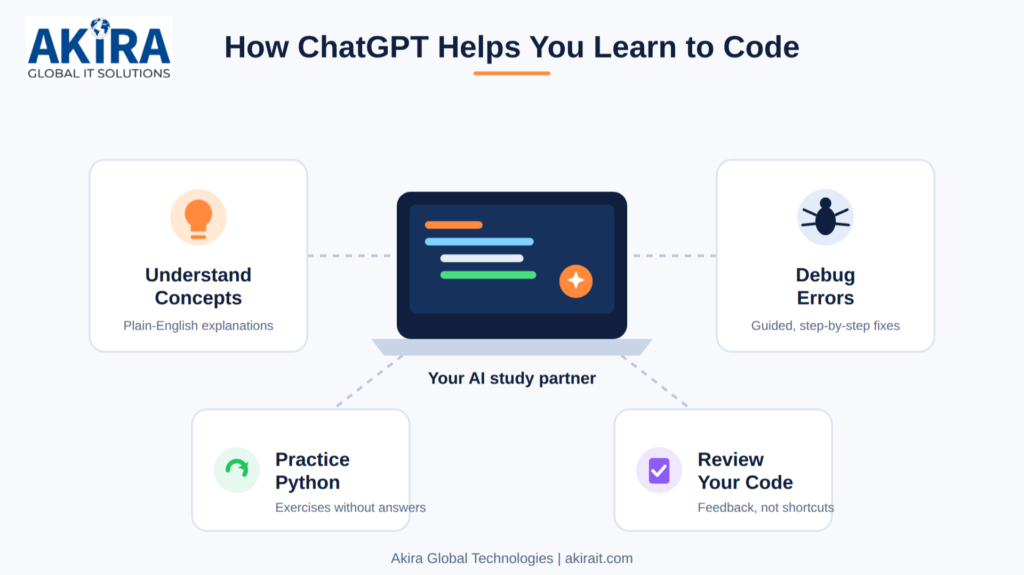
Alt text – How ChatGPT Helps You Learn to Code
How to Become a Better Programmer Alongside AI Tools
AI tools are now part of a developer’s daily work, so learning to work with them is a skill in itself. The goal is not to avoid AI. It is to stay in charge of it.
Build these habits early:
- Read more code than you generate. Reviewing code, yours and AI’s, sharpens your judgment.
- Learn to test. Write small tests or sample inputs to check that AI-generated code behaves correctly.
- Use version control. Tools like Git help you track changes and undo mistakes.
- Learn the fundamentals deeply. Algorithms, data structures, and debugging let you spot when an AI answer is off.
- Keep building projects. Real projects show you what tutorials hide.
As you grow, it helps to follow how the tooling landscape evolves. A roundup of AI tools for developers 2026 can help you decide which assistants are worth adding to your workflow once your basics are solid.
Conclusion
The best way to use ChatGPT to learn programming is to treat it like a tutor who asks as many questions as it answers. Set your level, learn one concept at a time, write code yourself, and ask for review instead of replacement. Debug with hints, practice with answer-free exercises, and keep verifying what you are told.
Your next steps are simple:
- Choose one language and one goal for the next 30 days.
- Ask ChatGPT to draft a roadmap, then adjust it to your schedule.
- Pick one prompt from this guide and try it in your next study session.
- Build a small project and explain every line to yourself.
- Consider structured, mentor-led training, such as the programs at Akira Global Technologies, once you want deeper skills and real project experience.
When AI-assisted learning supports your effort instead of replacing it, you learn faster and you understand more.
Frequently Asked Questions
- Can ChatGPT help beginners learn programming?
Yes. ChatGPT can explain concepts in simple language, generate examples, suggest practice exercises, and help you understand error messages. It works best when you attempt problems yourself first and use it for feedback. Always verify its answers by running the code.
- How can I use ChatGPT to learn Python?
Start by telling it you are a beginner and ask it to teach one topic at a time, such as variables, then conditions, then loops. After each topic, request practice questions without answers, solve them in your editor, and paste your code for a review. Finish with a small project.
- Is ChatGPT enough to learn programming?
Not on its own. It is excellent for explanations and practice, but it can make mistakes and does not give you structured progression, real project experience, or human mentorship. Combine it with a curriculum, hands-on projects, and official documentation. Learners often pair it with guided programs, like those offered by Akira Global Technologies, which add live classes, projects, and mock interviews.
- Can ChatGPT help me debug coding errors?
Yes. Paste the full error message, the relevant code, and what you expected to happen. Ask it to explain the cause and guide you step by step rather than just giving the fix. Then run the corrected code yourself to confirm it works.
- What are the best ways to use AI while learning to code?
Use it to explain concepts, quiz you, review your code, and break down errors. Ask for hints before solutions, request alternative approaches, and write code from scratch regularly. Avoid copying answers you cannot explain, and never share passwords or private data.