Every software release carries the same quiet risk: something that worked yesterday breaks today. Checking every screen, form and workflow by hand after each change is slow, and even careful testers miss things when they repeat the same steps for the hundredth time. That is the problem automation testing solves.
If you have been asking what is automation testing and whether it is worth learning, this guide covers the definition, how the process works, the main tools, a hands-on Selenium tutorial and a realistic path into a QA automation career. At Akira Global Technologies, we help learners and working professionals build job-ready technology skills, and testing is one of the most practical places to start. By the end, you will know what to learn first and what to build next.
What Is Automation Testing?
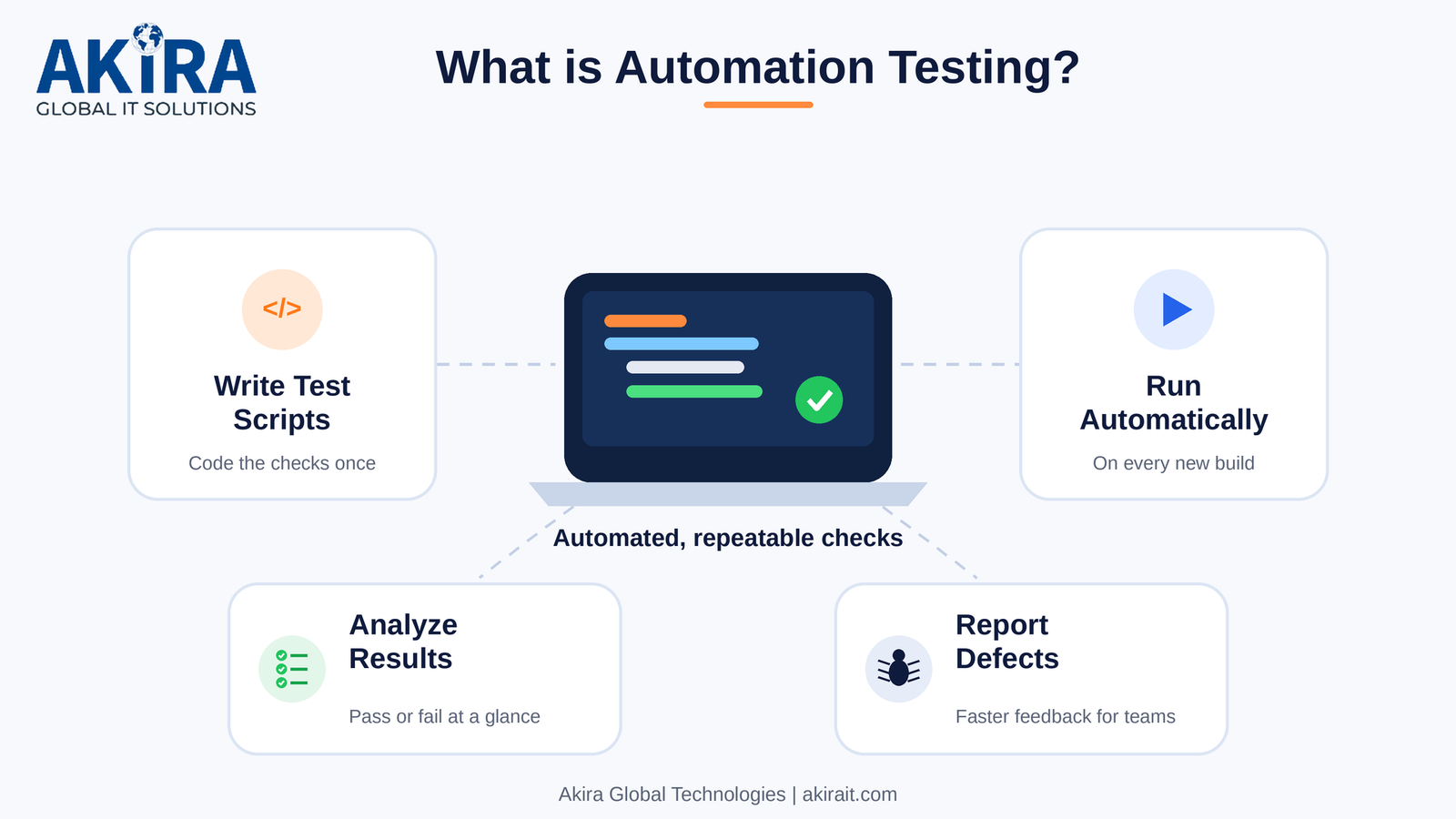
Automation testing is the practice of using software tools and scripts to run test cases on an application automatically, compare actual results with expected results, and report the outcome without a person performing each step. It is used to confirm that features keep working correctly, especially after code changes.
In short, a tester writes the checks once and the machine repeats them as often as needed, whether that is ten times a day or on every code commit.
Real-world example
Picture an online store. A critical journey is checkout: open the site, search for a product, add it to the cart, enter test payment details in a sandbox, place the order and confirm that the order confirmation page appears. Done manually, a tester repeats this in several browsers after every build. With automation, one script runs the full journey in minutes and flags exactly which step failed, freeing testers for exploratory work.
How Does Automation Testing Work?
Automation testing works in three stages: writing test scripts, executing them automatically, and analysing the results in a report. Each stage feeds the next, and the cycle repeats with every new build.
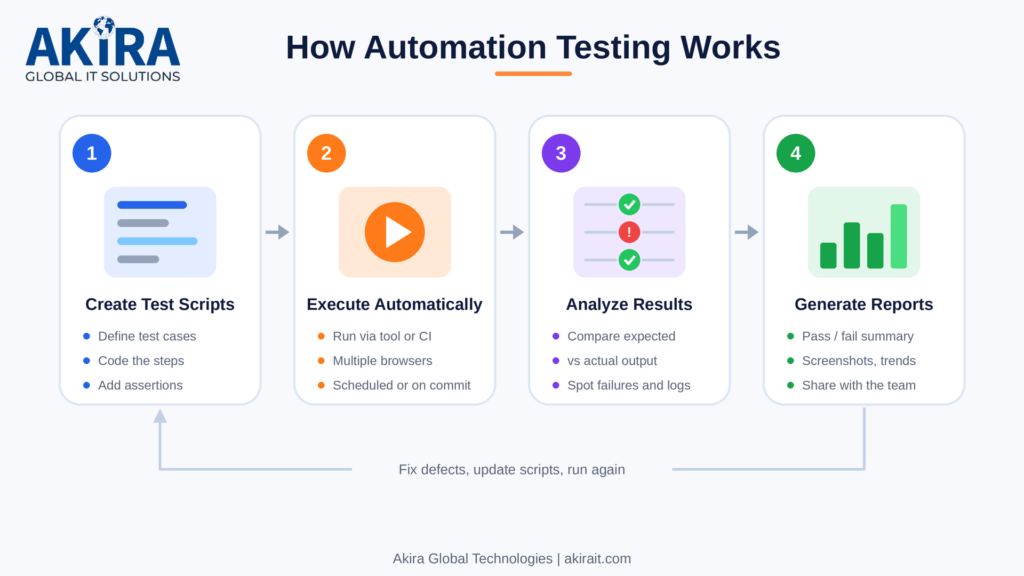
The automation testing workflow, from script creation to reporting
Test scripts
A test script is code that imitates what a user does and then checks the outcome using assertions. Scripts are commonly written in Java, Python, JavaScript or C#. A good script finds page elements with stable locators (ID, CSS selector or XPath), performs an action such as a click or text entry, and asserts that the application responded correctly.
Test execution
The script runs through a test framework or tool, either on a tester’s machine or on a CI server such as Jenkins, GitHub Actions or GitLab CI. Teams often run tests headless (no visible browser window) and in parallel, which cuts run time sharply.
Result analysis and reporting
After a run, the framework records which tests passed or failed, along with error messages, logs and often screenshots. Reporting tools such as Allure or ExtentReports turn this into dashboards. The team then triages each failure: is it a real defect, an outdated script, or an unstable (flaky) test?
Types of Automation Testing
Automation can be applied at several levels of an application. These are the types you will meet most often:
- Unit testing: verifies individual functions or classes in isolation. Developers usually write these with JUnit, NUnit or pytest.
- Integration testing: checks that modules, services or APIs work together, for example an application and its database.
- Functional testing: validates a feature against its requirements from the user’s point of view, such as login or search.
- Regression testing: re-runs existing tests after a change to confirm nothing else broke. It is the most common use of automation because the checks are repetitive and valuable.
- Smoke testing: a short set of critical checks run on a new build to decide whether deeper testing is worth starting.
- Performance testing: measures speed and stability under load using tools such as Apache JMeter or k6. Simulating thousands of users by hand is not realistic.
Manual Testing vs Automation Testing
Manual testing is not obsolete, and automation does not replace it. The two serve different goals, and mature teams use both.
| Factor | Manual Testing | Automation Testing |
| Execution speed | Slower, limited by the tester’s time | Fast, and can run in parallel and overnight |
| Accuracy on repeated tasks | Prone to human error and fatigue | Consistent, the same steps every run |
| Upfront effort | Low, start testing immediately | Higher, scripts and frameworks must be built |
| Long-term cost | Grows with every release cycle | Falls as scripts are reused |
| Best suited for | Exploratory, usability and ad hoc testing | Regression, smoke, data-heavy and load testing |
| Skills needed | Domain knowledge and attention to detail | Programming, tool knowledge and framework design |
| Human judgement | Strong, can notice unexpected issues | Limited to what the script checks |
Benefits of Automation Testing
At Akira Global Technologies, we see automation as a core skill for modern testers, and these are the benefits that explain why:
- Faster test execution: a regression suite that takes a team days by hand can finish in minutes or hours, so feedback reaches developers sooner.
- Improved accuracy: scripts do not skip steps or lose focus, which removes a major source of missed defects in repetitive checks.
- Better test coverage: automation makes it practical to cover more browsers, devices, data combinations and edge cases.
- Reusability: one well-written script can be reused across builds and environments.
- Cost and time efficiency over the long term: building automation costs effort upfront, but the savings grow with each release because the same checks no longer consume tester hours.
- Continuous testing support: automated tests can run on every commit inside a CI/CD pipeline, catching problems while they are still cheap to fix.
Popular Automation Testing Tools
Choosing from the many automation testing tools available is easier once you know what each one is built for. Some tools drive a browser or device, while others are frameworks that organise and run your tests.
| Tool | Primary use | Languages | Key points |
| Selenium | Web browser automation | Java, Python, C#, JavaScript, Ruby, Kotlin | Open source, widest browser and language support, large community. Needs a framework for structure and reporting. |
| Cypress | End-to-end and component testing for web apps | JavaScript, TypeScript | Runs inside the browser, fast feedback and strong debugging. Limited to JavaScript or TypeScript. |
| Playwright | End-to-end web testing | JavaScript, TypeScript, Python, Java, .NET | Supports Chromium, Firefox and WebKit, with built-in auto-waiting, parallel runs and tracing. |
| Appium | Mobile app testing (Android and iOS) | Several, through WebDriver client libraries | Open source, covers native, hybrid and mobile web apps. |
| JUnit | Unit testing framework | Java | The standard foundation for Java tests, often paired with Selenium for assertions and test structure. |
| TestNG | Test framework | Java | Adds test grouping, parameterisation, parallel execution and richer reports. Common alongside Selenium. |
The main distinction: Selenium, Cypress and Playwright automate browsers, Appium automates mobile apps, and JUnit and TestNG are frameworks that structure and run tests rather than control a browser themselves. Many Java teams combine Selenium with TestNG or JUnit. For a quick start on a modern web app, Playwright and Cypress are friendly options, while Selenium offers the broadest language and browser support.
In the Salesforce ecosystem, teams use Apex test classes for backend logic (Salesforce requires at least 75% Apex code coverage to deploy to production) and UI tools such as Selenium or the Salesforce-focused tool Provar for the Lightning interface. Dynamic page structures there make locator strategy an important skill.
Selenium Tutorial: Getting Started
This Selenium tutorial gives you the essentials and a working first script. We use Python because its syntax is easy to read, but the same ideas apply in Java and other languages.
What is Selenium?
Selenium is an open-source suite for automating web browsers. It lets your code open a page, click, type, read text and verify results, exactly as a user would.
Selenium components
- Selenium WebDriver: the core API that controls a real browser through a browser-specific driver.
- Selenium IDE: a browser extension for recording and replaying interactions, useful for quick prototypes.
- Selenium Grid: runs tests in parallel across multiple machines, browsers and operating systems.
Basic prerequisites
You need basic Python knowledge, Python 3 with pip, a browser such as Chrome, a code editor, and a working understanding of HTML and CSS selectors. Since Selenium 4.6, a built-in tool called Selenium Manager downloads the matching browser driver for you.
Your first Selenium script
- Install the library with pip install selenium.
- Save the script below as test_login.py.
- Run it with python test_login.py and watch Chrome log in automatically.
from selenium import webdriver
from selenium.webdriver.common.by import By
from selenium.webdriver.support.ui import WebDriverWait
from selenium.webdriver.support import expected_conditions as EC
driver = webdriver.Chrome()
try:
driver.get(“https://www.saucedemo.com“)
driver.find_element(By.ID, “user-name”).send_keys(“standard_user”)
driver.find_element(By.ID, “password”).send_keys(“secret_sauce”)
driver.find_element(By.ID, “login-button”).click()
WebDriverWait(driver, 10).until(EC.url_contains("inventory"))
assert "inventory" in driver.current_url
print("Login test passed")
finally:
driver.quit()
The script targets Sauce Demo, a public practice site built for testers. It enters credentials, clicks login, waits explicitly for the next page, asserts the result and always closes the browser. Explicit waits and a closing step are habits worth building from day one.
Skills Required for Automation Testing
At Akira Global Technologies, we encourage learners to build these skills together rather than in isolation, because automation roles depend on all of them:
- Programming fundamentals: variables, loops, conditions, functions and object-oriented basics in Java, Python or JavaScript.
- Testing concepts: test case design, the bug life cycle, the software testing life cycle and Agile practices.
- Automation frameworks: patterns such as Page Object Model, data-driven testing and behaviour-driven development with Cucumber.
- API and database testing basics: sending and validating REST requests with Postman or REST Assured, and writing simple SQL queries to verify data.
- Version control and CI/CD: Git for collaboration and a pipeline tool such as Jenkins to run tests automatically.
- Debugging and analytical skills: reading logs, isolating the cause of a failure and judging whether a problem sits in the code, the test or the environment.
How to Get Started with Automation Testing
If you are wondering how to learn an automation testing course from scratch, follow these six steps in order.
- Understand software testing fundamentals. Learn test cases, test types, defect reporting and the testing life cycle before touching a tool.
- Learn a programming language. Pick one, such as Python or Java, and practise until you can write small programs comfortably.
- Understand Selenium or another suitable tool. Start with Selenium for broad job relevance, or Playwright if you prefer a modern JavaScript stack.
- Practice writing test scripts. Automate login, search and form flows on public practice sites and focus on reliable locators and waits.
- Learn automation frameworks. Organise your scripts with a test runner such as TestNG, JUnit or pytest and apply the Page Object Model.
- Work on practical projects. Build an end-to-end suite for a demo application, connect it to Git and a CI pipeline, and publish it as proof of skill.
QA Automation Career: Opportunities, Skills & Growth
A QA automation career offers a clear path for people who enjoy both quality and code. Because every software team needs to release safely and quickly, testing skills are useful across many industries.
Relevant job roles include QA Automation Engineer, Software Development Engineer in Test (SDET), Performance Test Engineer, Test Automation Architect and QA Lead. Employers typically look for solid programming skills, hands-on experience with a tool like Selenium or Playwright, framework design, API testing, Git and CI/CD familiarity, and clear communication about defects.
Career progression often runs from manual or junior tester to automation engineer, then senior engineer or SDET, and on to automation architect, QA lead or engineering manager. Some professionals also move into development or DevOps.
Testing skills also travel well into specialist platforms. Our Salesforce career guide 2026 explains the roles and certifications in that ecosystem, which is useful context if you want to specialise in testing Salesforce applications.
Common Challenges in Automation Testing and How to Overcome Them
- High initial effort: start small. Automate stable, high-value flows first and expand gradually.
- Flaky tests: use explicit waits, stable locators and independent test data instead of fixed delays.
- Maintenance when the interface changes: apply the Page Object Model so a locator change is fixed in one place.
- Automating the wrong things: automate repetitive, predictable checks and keep exploratory and usability testing manuals.
- Test data and environment issues: use dedicated test environments and repeatable data setup.
Future Scope of Automation Testing
Automation is moving closer to development and becoming smarter. Key trends include:
- AI-assisted testing: tools increasingly help generate test cases and repair broken locators, though human review remains essential.
- Shift-left testing: tests are written earlier, alongside code, and run in every pipeline.
- API-first strategies: teams test business logic at the API layer for speed and stability, keeping UI tests for key journeys.
Why Learning Automation Testing Can Be a Valuable Career Investment
Automation testing rewards a modest learning investment with skills that transfer widely. You learn to code, to think about risk and to work inside modern delivery pipelines, all valued in QA, development and DevOps roles. The principles of reliable test design also stay the same even when tools change.
Testing becomes even more valuable when paired with platform knowledge. If you want structured, instructor-led learning on a widely used enterprise platform, a Salesforce Training Course is a sensible companion to your testing skills.
Conclusion
So, what is automation testing? It is the use of scripts and tools to run repeatable checks on software quickly, consistently and at scale, so that teams can release with confidence. It supports manual testing rather than replacing it, and it rewards anyone willing to learn a language, a tool and good framework habits. Pick one tool, write your first script this week, and build from there.
Key Takeaways
- Automation testing uses scripts and tools to run test cases automatically, compare actual and expected results, and report outcomes.
- Major benefits are faster execution, higher accuracy, wider coverage, reusable tests and support for continuous testing in CI/CD.
- Popular automation testing tools include Selenium, Cypress, Playwright, Appium, JUnit and TestNG, each suited to different needs.
- Core skills are programming, testing fundamentals, framework design, API and database basics, and strong debugging.
- Beginners should learn testing basics, pick a language, follow a Selenium tutorial, practise scripts and build a small project.
- Career roles include QA Automation Engineer and SDET, with growth towards architect, lead or DevOps-oriented roles.
Frequently Asked Questions
- What is automation testing in simple terms?
Automation testing means using scripts and tools to check software automatically instead of clicking through it by hand. A tester writes the test once, the tool runs it whenever needed, and the results show what passed or failed. It is most useful for repetitive checks such as regression testing after every code change.
- Which tools are commonly used for automation testing?
The most common automation testing tools are Selenium, Cypress and Playwright for web applications, and Appium for mobile apps. JUnit and TestNG are frameworks used with Java to organise and run tests. Postman and REST Assured handle API testing, while Apache JMeter and k6 are popular for performance testing.
- Is Selenium suitable for beginners?
Yes, Selenium is a good starting point because it is free, well documented and widely used across the industry. Beginners should first learn a language such as Python or Java, then follow a Selenium tutorial and practise on demo sites. Playwright and Cypress are also beginner-friendly alternatives if you prefer JavaScript.
- Do I need coding knowledge to learn automation testing?
Basic coding knowledge is strongly recommended. Most automation testing roles expect you to write and maintain scripts in a language such as Java, Python or JavaScript. Low-code and record-and-playback tools exist, but they offer limited flexibility. You do not need advanced programming to begin, only the fundamentals and steady practice.
- Is QA automation a good career choice?
For many people, yes. A QA automation career combines testing expertise with programming, and nearly every software team needs reliable, automated quality checks. Roles such as QA Automation Engineer and SDET offer growth towards lead, architect or DevOps paths. Success depends on building real skills and showing them through projects.